বর্ণমালা কিবোর্ডBornomala Keyboard
দ্রুত আর সহজে বাংলা লিখুনType Bangla quickly and easily
স্কুলে শেখা বর্ণমালার ক্রমে সাজানো Android ফোনের বাংলা কিবোর্ড, যাতে সবাই, বিশেষ করে বয়স্ক মানুষেরা, নতুন কিছু না শিখেই লিখতে পারেন।A Bangla keyboard for Android phones with the letters in the order of the school alphabet chart, so that anyone, and older people above all, can type without learning anything new.
শিগগিরই আসছেCOMING SOON TOGoogle Play-তেGoogle Play
Android ৭.০ বা তার পরের সংস্করণAndroid 7.0 or newer
- বিনামূল্যেFree
- কোনো বিজ্ঞাপন নেইNo ads
- যা লেখেন, ফোনের বাইরে যায় নাNothing you type leaves your phone
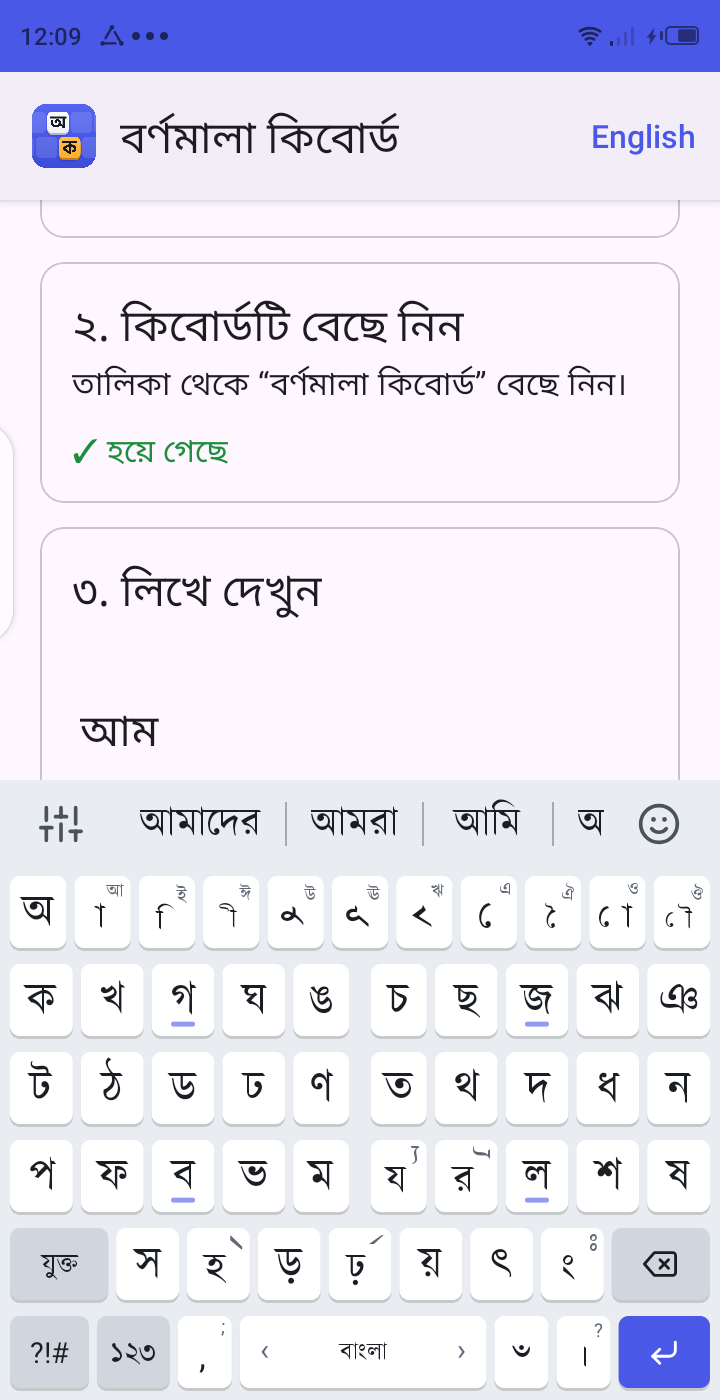
সুপরিচিত বর্ণমালার ক্রমThe letters are in alphabet order
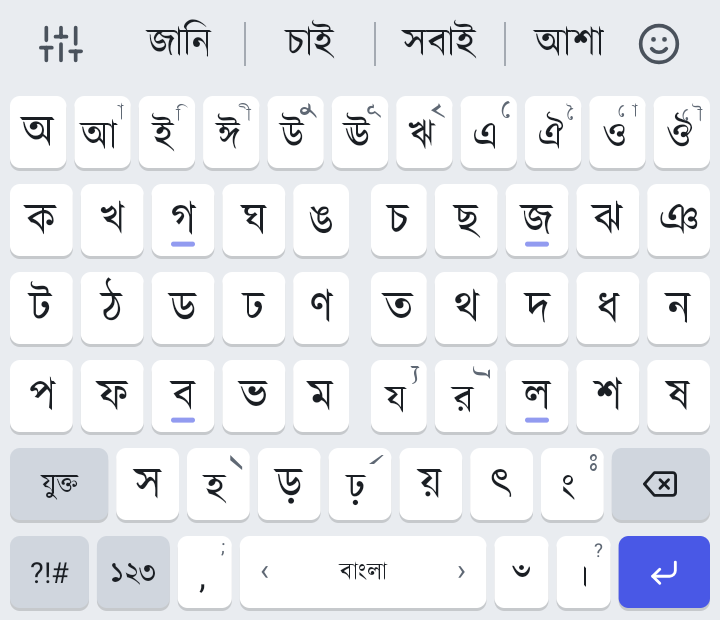
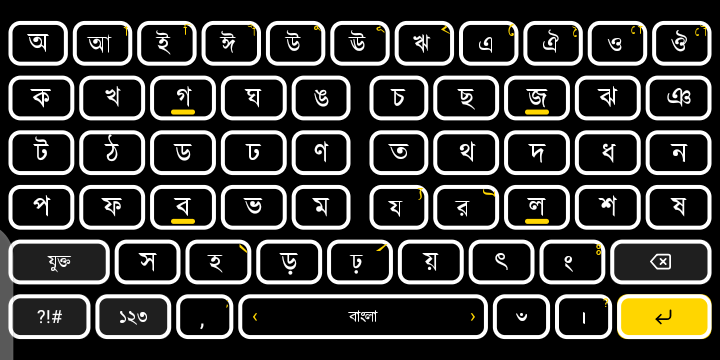
ওপরের সারিতে স্বরবর্ণ, অ থেকে ঔ। তার নিচে ব্যঞ্জনবর্ণ, ক থেকে শুরু করে ঠিক যে ক্রমে স্কুলে পড়েছেন।The top row holds the vowels, অ to ঔ. Below them come the consonants, starting at ক, in the order you read them at school.
- ১1
নতুন করে শিখতে হয় নাNothing new to learn
যিনি বর্ণমালা জানেন, তিনি এই কিবোর্ডও জানেন। ক-এর পরে খ, খ-এর পরে গ, ঠিক বইয়ের মতো।If you know the alphabet, you already know this keyboard. খ comes after ক and গ after খ, just as in the school book.
- ২2
বর্গগুলো আলাদাThe groups stand apart
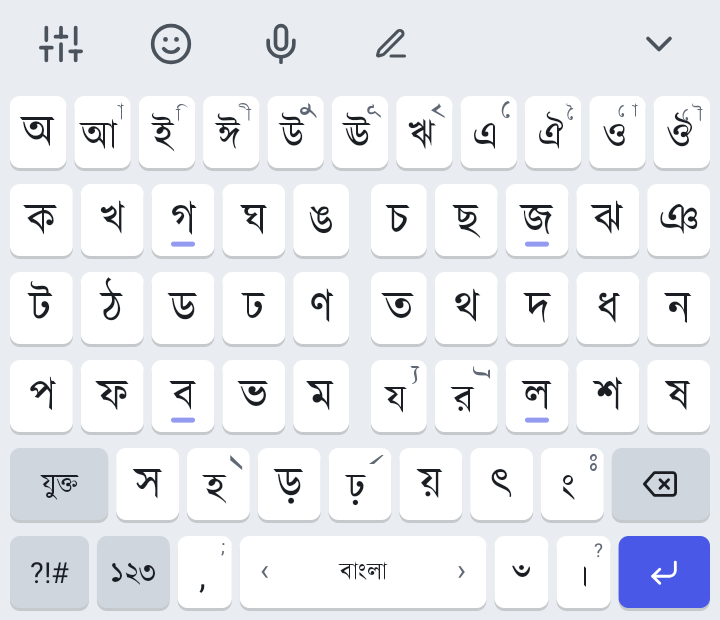
প্রতিটি সারিতে দুটি বর্গ, মাঝে একটু ফাঁক: ক থেকে ঙ, তারপর চ থেকে ঞ। আগে বর্গটা চোখে পড়ে, তারপর অক্ষরটা।Each row holds two groups with a gap between them: ক to ঙ, then চ to ঞ. You spot the group first, then the letter.
- ৩3
বড় বোতাম, স্পষ্ট অক্ষরLarge keys, clear letters
বোতামগুলো বড়, অক্ষর মোটা। আরও বড় চাইলে সেটিংসে বোতামের উচ্চতা আর অক্ষরের আকার বাড়িয়ে নিন।The keys are large and the letters are bold. If you want them bigger, raise the key height and letter size in settings.
আর কী কী আছেWhat else it does
-
কার বসে স্বরবর্ণের বোতামেইKars on the vowel keys
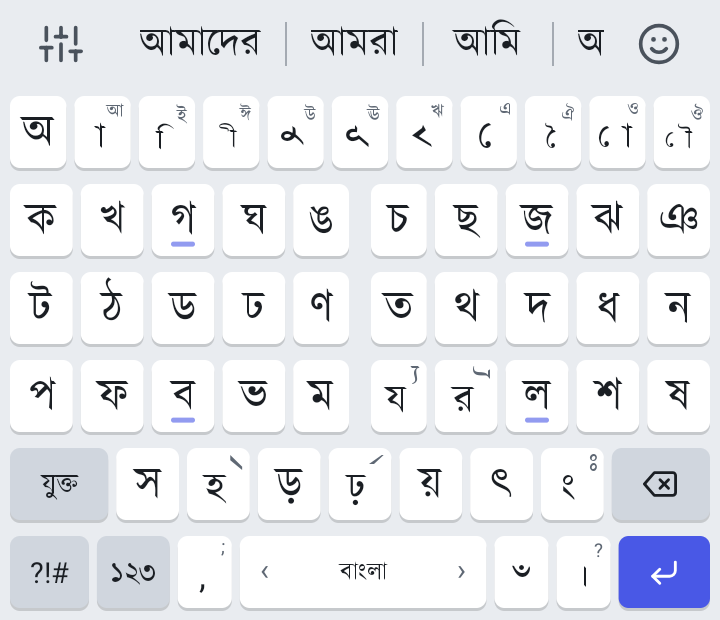
ক লিখে আ চাপলে কা হয়। ব্যঞ্জনবর্ণের পরে স্বরবর্ণের বোতামগুলো নিজেরাই কার দেখায়। পুরো স্বরবর্ণ লাগলে বোতামটি চেপে ধরুন।Type ক, then tap আ, and you get কা. After a consonant the vowel keys show their kars. For the full vowel, press and hold the key.
-
ফলা, রেফ আর যুক্তবর্ণPhola, ref and conjuncts
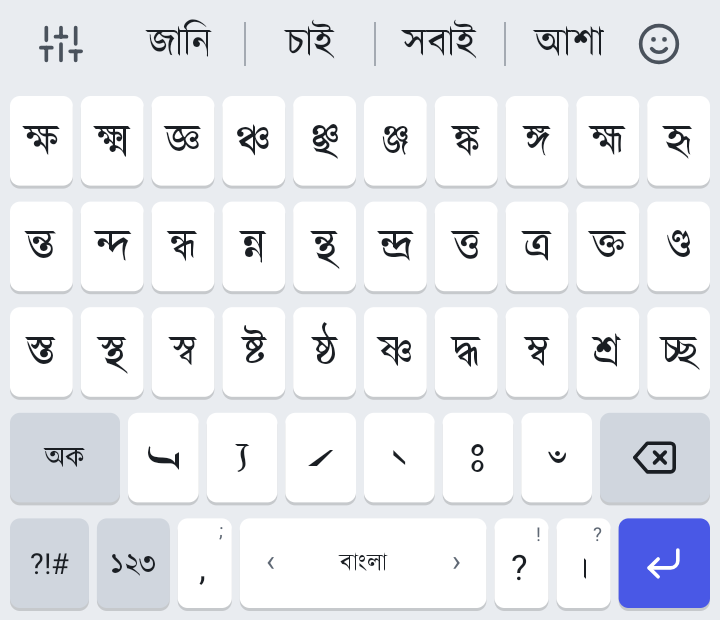
হ দুবার চাপলে হসন্ত, র দুবার চাপলে র-ফলা, য দুবার চাপলে য-ফলা, ঢ় দুবার চাপলে রেফ। দুবার না চেপে চেপে ধরলেও হয়। ক্ষ, ন্ত, শ্র-এর মতো যুক্তবর্ণ “যুক্ত” বোতামে তৈরি আছে।Tap হ twice for hasanta, র twice for ro-phola, য twice for jo-phola and ঢ় twice for ref, or press and hold instead. Conjuncts such as ক্ষ, ন্ত and শ্র are ready on the যুক্ত key.
-
কণ্ঠে লেখাVoice typing
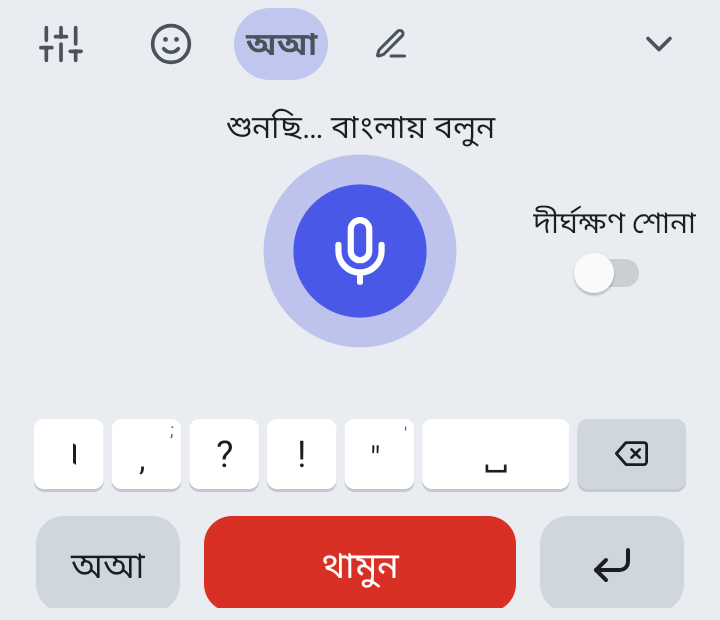
মাইক বোতাম চেপে বাংলায় কথা বলুন, কথাগুলো লেখা হয়ে যায়। কথা থামালে বা “থামুন” চাপলে লেখা বসে যায়। এর জন্য সাধারণত ইন্টারনেট লাগে।Tap the mic and speak in Bangla, and your words are written for you. They go in when you stop talking or tap Stop. This usually needs the internet.
-
হাতে লেখাHandwriting
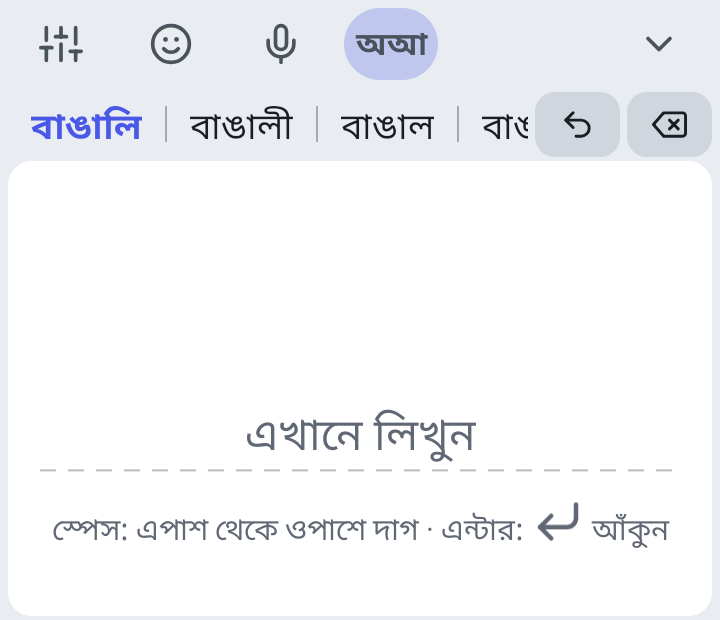
কলম বোতাম চেপে আঙুল দিয়ে বড় করে একটি শব্দ লিখুন। ফোন নিজেই লেখাটা পড়ে নেয়, কিছুই বাইরে পাঠায় না। প্রথমবার প্রতিটি ভাষার জন্য প্রায় ২০ MB-এর একটি ফাইল নামাতে হয়।Tap the pen and write one word large with your finger. The phone reads it itself and sends nothing out. The first time, it downloads a file of about 20 MB for each language.
-
শব্দ সাজেশনWord suggestions
লিখতে লিখতে ওপরের সারিতে পুরো শব্দ আসে, ছুঁলেই বসে যায়। স্পেস দেওয়ার পর পরের সম্ভাব্য শব্দও দেখায়, বাংলা আর ইংরেজি দুই ভাষাতেই।As you type, whole words appear in the top row; tap one to put it in. After a space it shows words that often come next, in Bangla and in English.
কিবোর্ড শুধু দেখায়, নিজে থেকে আপনার লেখা কখনো বদলায় না। আপনার শব্দ সে শেখে শুধু এই ফোনে, পাসওয়ার্ডের ঘরে কিছুই শেখে না।It only suggests and never changes your text on its own. It learns your words on this phone only, and never in password fields.
-
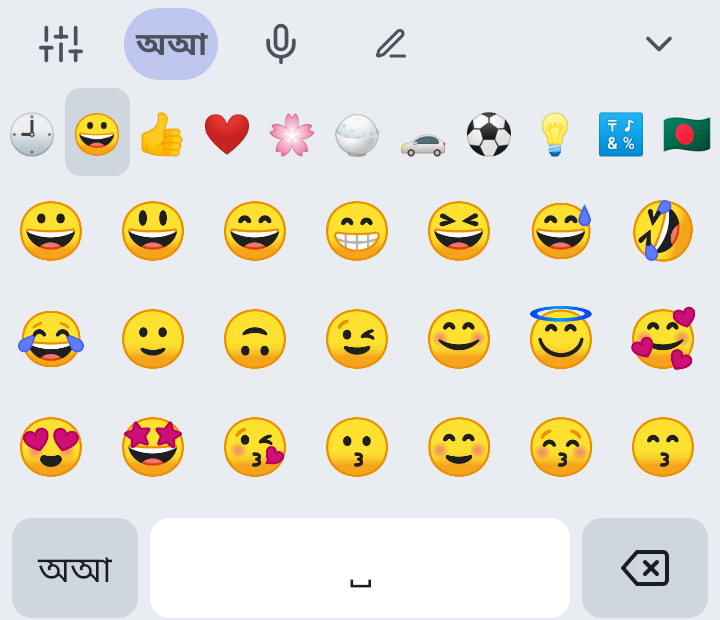
ইমোজি, সংখ্যা আর চিহ্নEmoji, numbers and symbols
সব ইমোজি আছে। সংখ্যার জন্য আলাদা প্যাড, আর চিহ্ন ও গণিতের চিহ্নের জন্য আলাদা পাতা।All the emoji are there, with a number pad and separate pages for symbols and maths signs.
-
থিম আর আকারThemes and sizes
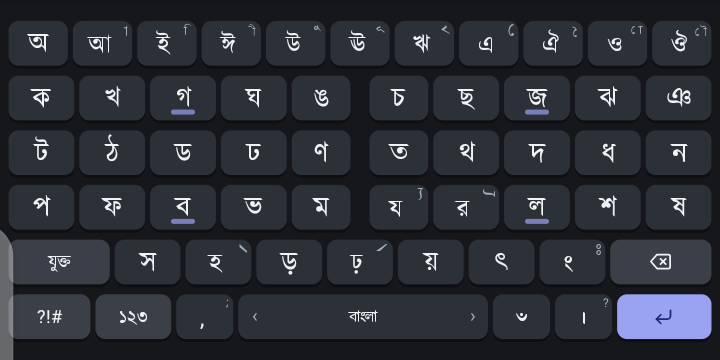
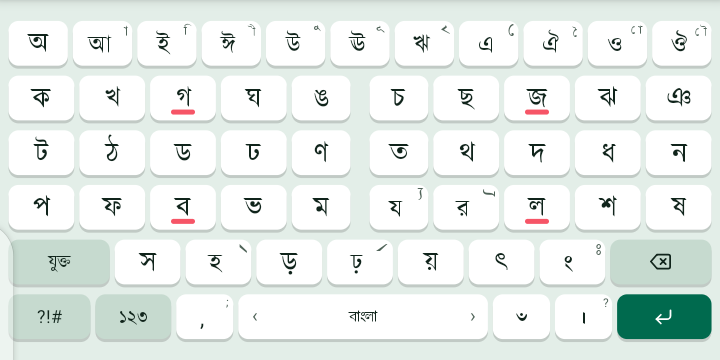
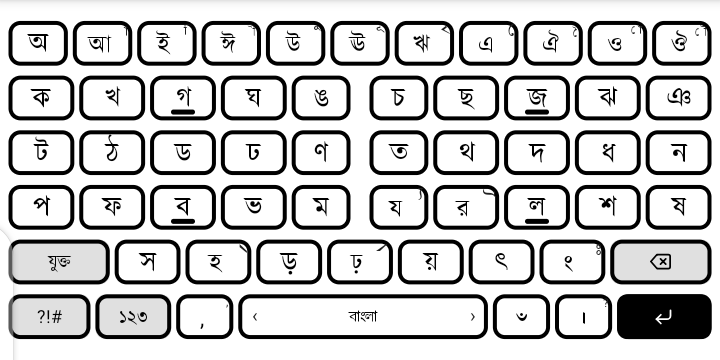
৬টি থিম, তার দুটি উচ্চ কনট্রাস্টের। বোতামের উচ্চতা আর অক্ষরের আকার ছোট থেকে অনেক বড় পর্যন্ত বেছে নেওয়া যায়।Six themes, two of them high contrast. Key height and letter size go from small to extra large.
ফন্ট, চারকোনা না গোল বোতাম, বোতামের মাঝের ফাঁক, চেপে ধরার সময়, দুবার চাপার গতি, কাঁপা আর শব্দও নিজের মতো ঠিক করে নিন।You can also set the font, square or round keys, the spacing, the long-press time, the double-tap speed, vibration and sound.
-
ইংরেজিও আছেEnglish too
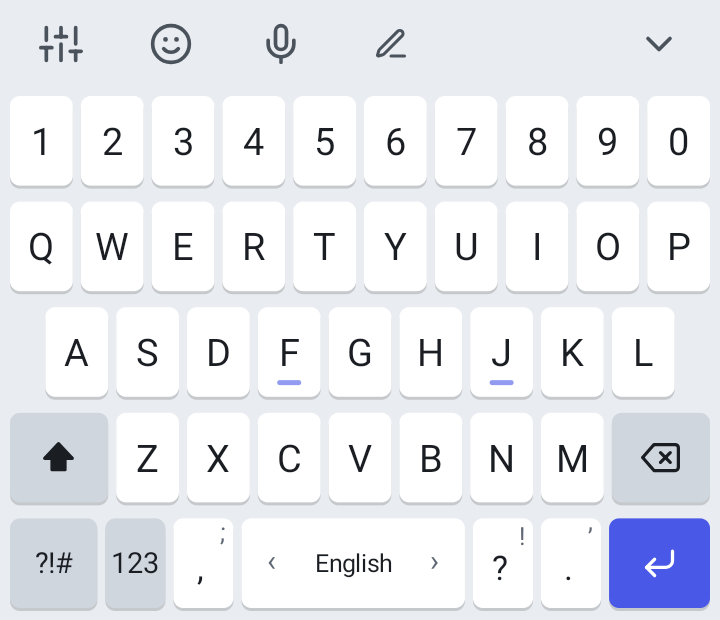
ইংরেজির জন্য চেনা QWERTY বোতাম, ওপরে সংখ্যার সারি। স্পেস বোতামে আঙুল টানলেই ভাষা বদলায়।English has the familiar QWERTY layout, with a row of numbers on top. Slide along the space bar to switch language.
শিগগিরই আসছেCOMING SOON TOGoogle Play-তেGoogle Play
Android ৭.০ বা তার পরের সংস্করণAndroid 7.0 or newer
শুরু করতে তিনটি ধাপThree steps to start
- ১1
Google Play থেকে নামানDownload it from Google Play
বিনামূল্যে, কোনো অ্যাকাউন্ট লাগে না।It is free and needs no account.
- ২2
কিবোর্ডটি চালু করুনTurn the keyboard on
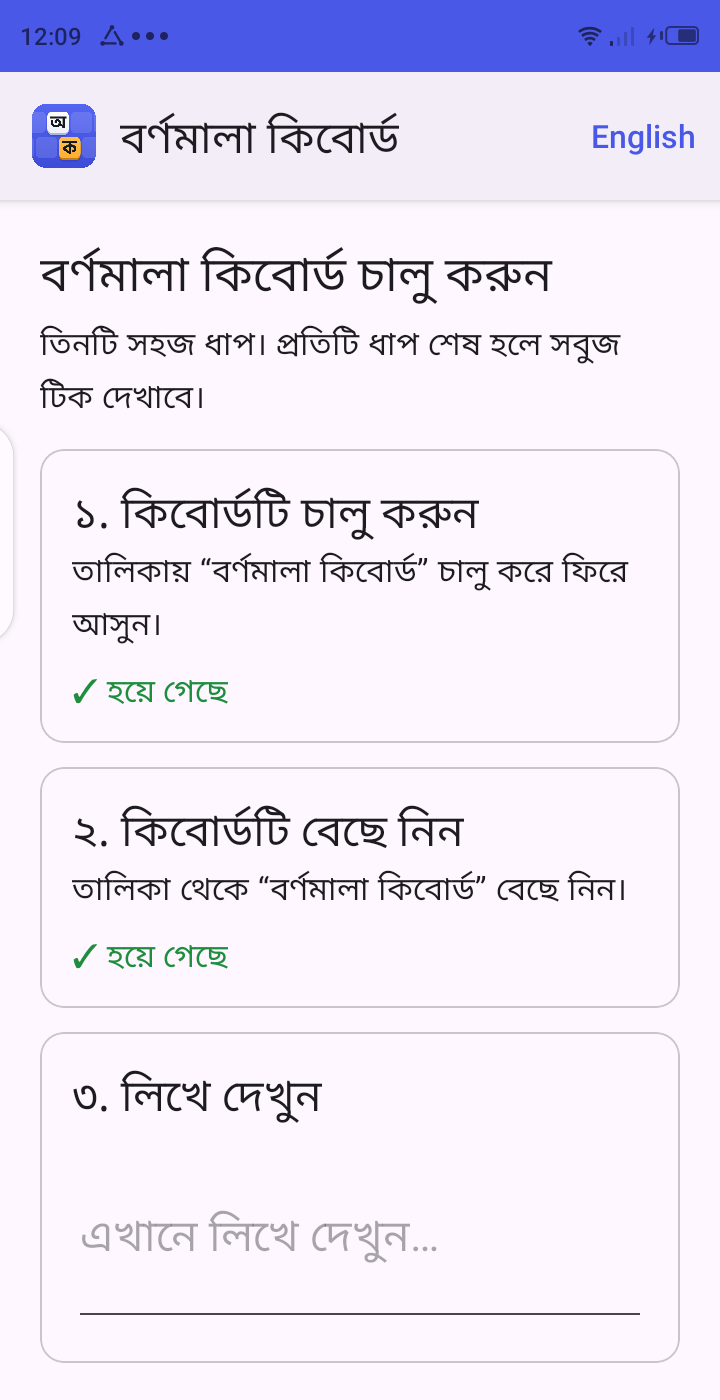
অ্যাপ খুললে সে প্রতিটি ধাপ দেখিয়ে দেয়, ধাপ শেষ হলে সবুজ টিক আসে। এ সময় Android একটা সতর্কবার্তা দেখায়, যা ফোনের সঙ্গে আসেনি এমন সব কিবোর্ডেই আসে। “ঠিক আছে” চাপুন।Open the app and it shows you each step, with a green tick when one is done. Android shows a warning at this point, the same one it shows for every keyboard that did not come with the phone. Tap OK.
- ৩3
লিখতে শুরু করুনStart typing
যেকোনো অ্যাপে লেখার ঘর ছুঁলেই বর্ণমালা কিবোর্ড চলে আসবে।Tap a text box in any app and Bornomala Keyboard comes up.
আপনার লেখা আপনার ফোনেই থাকেWhat you type stays on your phone
- আপনি যা লেখেন, তা আমাদের কোনো সার্ভারে যায় না, কারো সঙ্গে শেয়ারও হয় না।Nothing you type is sent to our servers or shared with anyone.
- অ্যাকাউন্ট খুলতে হয় না, কোনো বিজ্ঞাপন নেই।There is no account to open and there are no ads.
- নতুন শব্দ শেখে শুধু এই ফোনে, পাসওয়ার্ডের ঘরে কিছুই শেখে না। শেখা শব্দ সেটিংস থেকে মুছে ফেলা যায়।It learns new words on this phone only, and never in password fields. You can clear what it learned in settings.
- কণ্ঠে লেখার সময় আপনার কথা যায় ফোনের কণ্ঠ-শনাক্তকরণ সেবায়, সাধারণত Google-এ।For voice typing, your speech goes to the phone's speech service, usually Google.
প্রশ্ন ও উত্তরQuestions and answers
এটা কি বিনামূল্যে?Is it free?
হ্যাঁ, বিনামূল্যে। কোনো বিজ্ঞাপনও নেই।Yes, it is free, and there are no ads.
ইন্টারনেট লাগে?Does it need the internet?
বোতাম চেপে লেখা আর শব্দ সাজেশন ইন্টারনেট ছাড়াই চলে। হাতে লেখার জন্য প্রথমবার একটি ফাইল নামাতে ইন্টারনেট লাগে। কণ্ঠে লেখায় সাধারণত ইন্টারনেট লাগে।Typing on the keys and word suggestions work without the internet. Handwriting needs it once, to download its file. Voice typing usually needs it.
কোন ফোনে চলবে?Which phones does it work on?
Android ৭.০ বা তার পরের সংস্করণের যেকোনো ফোনে। iPhone-এ চলে না।Any phone with Android 7.0 or newer. It does not work on iPhone.
আমার লেখা কি নিরাপদ?Is what I type safe?
হ্যাঁ। আপনি যা লেখেন তা আমাদের কোনো সার্ভারে যায় না, আর পাসওয়ার্ডের ঘরে কিবোর্ড কিছুই শেখে না। চালু করার সময় Android যে সতর্কবার্তা দেখায়, তা ফোনের সঙ্গে আসেনি এমন সব কিবোর্ডেই দেখায়।Yes. Nothing you type goes to our servers, and the keyboard learns nothing in password fields. The warning Android shows when you turn it on appears for every keyboard that did not come with the phone.
যুক্তবর্ণ লিখব কীভাবে?How do I type conjuncts?
দুটি অক্ষরের মাঝে হসন্ত দিন। হ দ্রুত দুবার চাপলে হসন্ত বসে, যেমন ক, হসন্ত আর ষ মিলে ক্ষ। অনেক যুক্তবর্ণ “যুক্ত” বোতামে তৈরি আছে, এক চাপেই বসে যায়।Put a hasanta between two letters: tap হ twice quickly. ক, hasanta and ষ make ক্ষ. Many conjuncts are ready on the যুক্ত key and go in with one tap.
বোতাম আর অক্ষর বড় করব কীভাবে?How do I make the keys and letters bigger?
কিবোর্ডের ওপরের বাঁ কোণের সেটিংস বোতাম চাপুন। সেখানে “বোতামের উচ্চতা” আর “অক্ষরের আকার” থেকে বেছে নিন: ছোট, মাঝারি, বড় বা অনেক বড়।Tap the settings button at the top left of the keyboard. Under Key height and Letter size, choose Small, Medium, Large or Extra large.
দ্রুত আর সহজে বাংলা লিখুনType Bangla quickly and easily
শিগগিরই আসছেCOMING SOON TOGoogle Play-তেGoogle Play
Android ৭.০ বা তার পরের সংস্করণAndroid 7.0 or newer